When a man from West Boca was in California on business, all he could do about the man at his door with a rifle was watch in fear, knowing his family was inside the house.
The intruder was shown on the man’s cellphone app, recorded by his Ring doorbell camera nearly 3,000 miles away.
The threat ended without violence, one of many instances in which Ring Inc. touts its technology for helping to solve crimes. The man’s family called 911 and the gunman was arrested. At the same time, though, the company owned by Amazon is raising alarms among privacy advocates who warn that one of the world’s wealthiest corporations has created a nationwide surveillance network that tramples people’s rights and fosters racial stereotypes.
Ring has immense control over the video that gets archived, uses police departments to spread its influence and governs how police discuss the technology with the public, critics say.
A blog post by the company in August 2019 boasted partnerships with 405 law enforcement agencies nationwide. By March 2020, that number was over 950, including almost every police force in South Florida.
Partners include the Miami-Dade Police Department, Fort Lauderdale Police Department, Broward Sheriff’s Office, Boca Raton Police Department, Palm Beach Sheriff’s Office and more than 20 others in South Florida.
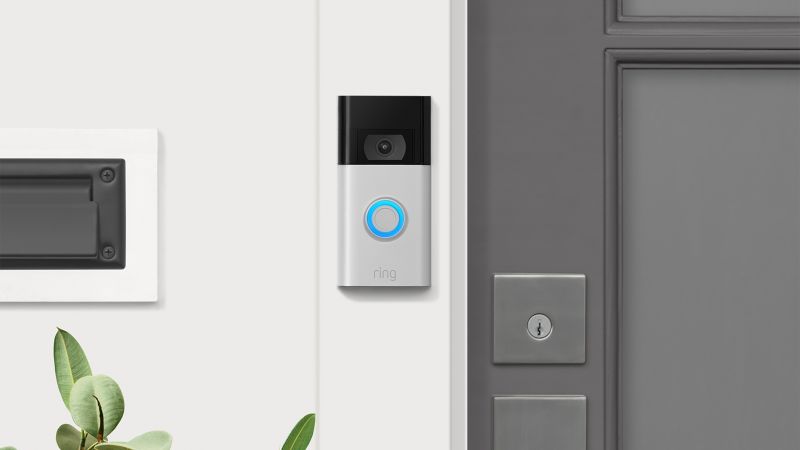
The Ring, arguably the most popular device of its type, can be used simply as a doorbell, or it can be set up to show only live video. It also includes an intercom that enables the user to speak with someone at the door.
But the arrangement that raises privacy concerns lets the homeowner record and archive video from anytime during the day, a function that costs a few bucks a month.
The gunman in West Boca is a rare example of the Ring’s use in a potentially dangerous situation. In most cases, the camera captures only petty crime, like the thief who took off with a package in Boynton Beach in December or the porch pirates in Pembroke Pines last year.
A growing number of organizations argue that these crimes do not justify surveillance that blurs the line between corporate and government surveillance and reveals personal information about people’s lives, especially people who do not own the devices or consent to being recorded by their neighbors.
A Ring doorbell photo shows a man at a door in Pembroke Pines, with neighbors' houses clearly visible in the background. (Pembroke Pines Police Department/Courtesy)
“It’s one thing to worry about suspicious neighbors looking out between their curtains,” said Jay Stanley, senior policy analyst with the speech, privacy and technology project at the ACLU. “It’s another if you are being recorded and potentially being reported to the police, and that’s especially true if you are a person of color or somebody else who is often cast as somebody who is, quote/unquote, ‘suspicious’ due to biases or prejudices.”
Some members of Congress have taken note of the concerns as well. The House Committee on Oversight and Reform has requested documents related to Ring’s relationship with law enforcement agencies.
A number of U.S. senators also requested information from Ring about its partnerships with police departments as well as what they consider the potential for it to link footage with facial recognition technology.
[
RELATED: Senators press Amazon over doorbell camera security concerns
]
Advocacy organizations want people to consider people’s privacy when the cameras are positioned in a way that takes video of roads, sidewalks or other people’s homes. The user has control over the area the camera scans.
“We’re telling people to be mindful of their neighbors,” said Saira Hussain, staff attorney at the Electronic Frontier Foundation, a digital rights and privacy organization.
“Ring as a company may be responsive to its customers, but it’s ignoring the larger issue of profiling within neighborhoods and about people who are walking about, doing their business, who are being captured on camera for no reason.”
The recorded content can offer a wealth of information about people’s work schedules, their vacation time and other personal information.
“If it was pointed at my property, I would be very upset,” said Stanley at the ACLU. “I would feel like [my neighbors] were spying on me.”
Ring has not released sales numbers, but data analytics firm Jumpshot estimated the company’s sales at 100,000 to 400,000 per month last year, peaking around Black Friday and Christmas time.
The Ring “makes me feel a little more secure when I’m not home and that packages aren’t being left for people to steal,” said David Murray, who installed his ring in Boynton Beach in February 2018.
[
RELATED: Do we really rank this low for porch pirates?
]
“I have not personally reported a crime, but the week I purchased and installed it, I had three men deliver a furniture piece when I wasn’t home and was able to see them looking through my windows, ‘scoping’ out the place,” Murray said. “Once I spoke over the intercom to leave the furniture on the patio, they immediately stopped what they were doing and left. It’s honestly a great tracking tool sometimes, too.”
Meagan Gross, of Pompano Beach, said Ring has offered her a feeling of safety, after a few run-ins with a neighbor. But she understands that people who don’t look like her can be viewed as criminals or suspicious just for minding their own business.
“As a white woman who is a citizen, I know I don’t have the same fears as people of color or immigrants may have when law enforcement shows up at the door,” she said.
Ring is aware of those concerns and urges customers to take them into account, a spokesperson said by email. The company’s policies prohibit users from using racial profiling or hate speech on their apps.
“As privacy and video surveillance laws vary by jurisdiction, we strongly encourage all of our customers to respect their neighbors’ privacy and comply with any applicable laws when setting up their Ring device,” the spokesperson said.
Most agreements between the police and Ring say that Ring has the right to approve statements that police departments put out about Ring’s technology.
Ring’s agreement with the Fort Lauderdale Police Department, for example, says, “The parties shall agree to a joint press release to be mutually agreed upon by the parties.”
That language also appears in the agreements between the company and the Broward Sheriff’s Office, Palm Beach Sheriff’s Office, Boynton Beach Police Department and others.
Boca Raton’s agreement with Ring says, “Neither party may issue a press release related to City’s participation in this program without the prior approval of the other party.”
In some partnerships, Ring has explicitly told police departments not to use certain language like “surveillance” and “security cameras.”
“Ring actually controls a lot of the messaging that goes out by these police agencies,” said Hussain, of the Electronic Frontier Foundation. “We’ve seen documents where Ring is saying, ‘Please don’t say the word ‘surveillance’ in your press release to describe these doorbells.’”
Ring responds that it does not govern what police departments tell the public or ask police to promote Ring’s products.
“We provide materials and information about the Neighbors app and our services to help ensure they are described accurately to the public,” the company said in an email. “Like most companies, Ring requests to review press releases regarding our products and services prior to distribution to ensure accuracy.”
Law enforcement officers can view or download footage recorded on these cameras a few ways. Users can post video publicly to the company’s Neighbors app, which can be viewed by other members within a few miles of that user, including the police department in that area.
Police officers also can request specific footage, and the camera’s owner can grant access to the officer, who can view or download the video.
If residents decline, cops can get the footage straight from Ring with a warrant or subpoena.
“If the homeowner does not respond to a video request from a detective, then we do not receive the video,” Casey Liening, public information specialist at the Fort Lauderdale Police Department, said in an email. But, “if the video is important to an investigation and the request is not fulfilled, the Fort Lauderdale Police Department may initiate legal process to obtain the video through Ring’s legal team.”
Mark Economou, spokesman for the Boca Raton Police Department, said the process is a more efficient way of canvassing neighborhoods for evidence.
[
RELATED: Beware of the smart device: Ways to stay private and safe
]
“Basically it is the same as us going door to door asking to look at the video from a certain time frame, if someone says no we move on,” he said in an email. “This makes it easier to obtain the video instead of knocking on doors and waiting for people to come home.”
Representatives from Boca Raton, Fort Lauderdale and Miami-Dade’s police departments said they do not track how many requests they send to residents for videos or how many cooperate.
In less than two months, the Broward Sheriff’s Office sent out about 63 requests for video to Ring users via the Neighbors App, according to public information officer Miranda Grossman. “The number of videos that are shared with detectives varies from case to case,” she said.
Austen Erblat can be reached at aerblat@sunsentinel.com, 954-425-1955 or on Twitter @AustenErblat.
After an appearance on “Shark Tank” in 2013, Jamie Siminoff went from shipping video doorbells from a garage to brokering a deal with Amazon. Now, Siminoff’s company, Ring, is one of the most well-known names in smart home gadgets.
With the backing of a known brand, the company expanded its portfolio. Ring’s product family in 2021 is large: seven doorbells, a bevy of smart lights, cameras, an alarm system and a forthcoming drone that will fly around your house. On February 2, Ring also announced a partnership with Lennar Communities to build neighborhoods in which all homes will be outfitted with at least a doorbell and devices that work with the ecosystem.
As the company’s product lineup continues to grow, we spoke with Siminoff, along with Nate Hardison, chief product officer and co-founder at Eero, about how Ring products fit into the increasing smartening of homes — and break down which of its myriad devices best meet your needs.
RING
Let’s start with the device that put Ring on the map: the video doorbell. As Siminoff puts it, “Ring comes from the position of making neighborhoods safer, making your home sort of a better place to live in and really connecting you, whether you’re home or away. We started with a very single-purpose model and we’ve kind of expanded from there.” The doorbell started as a way to see what’s going on at main entry and exit points for your home or apartment. And when you’re contemplating starting a smart home, it seems like the most reasonable first step.
And in this year alone with the pandemic, it has become a way to ensure no-contact or contactless deliveries, something we’ve all been keeping an eye on. While the original doorbell is a bit dated, it’s still found in the product line as $99.99 second-generation Video Doorbell. It’s also joined by an option at nearly every price point. Here’s how the company’s seven doorbells compare.
Ring Video Doorbell Wired ($59.99; amazon.com)
The latest addition to the Ring family is the Video Doorbell Wired. It’s dramatically smaller than the Video Doorbell. As the name suggests, there’s no battery pack option for power; it needs to be hardwired into your home’s power. Besides that, though, it’s basically on par with the Video Doorbell and Doorbell 3 Plus.
It has a 1080p HD lens for a clear view of our front yard and features motion zones. With the latter, you can mark out (via a live view of what the camera is seeing) what areas you’d like to receive alerts for. This way, if the street is in view, you can block out that portion to avoid an alert every time a car passes by.
By opting for a Ring Protect plan (starting at $3 per month), you can get rich notifications and Pre-Roll. With the former, notifications to your Android or iOS device will have footage from the camera built in; this way, you don’t need to open the app. Pre-Roll is available on the 3 Plus and the Pro, which are both higher-end options. But essentially, the Video Doorbell Wired will record three to five seconds before motion is picked up to give you the full story in an alert. It’s pretty handy, and having all these features available through a subscription makes the Video Doorbell Wired competitive — not just against other doorbells but also other Ring models.
Ring Video Doorbell ($99.99; amazon.com)
While the Video Doorbell Wired is the new entry point for the Ring lineup, it’s only a solution if you have the ability to hardwire it in. That can be costly if you don’t already have a non-smart but still powered doorbell in place. At $99.99, the Video Doorbell is the cheapest solution with a battery pack. It’s a great fit for homes without the proper wiring or if you want to add one to a backdoor or maybe even outside of a garage.
This update to the original Video Doorbell keeps the now iconic rectangular design, which leaves the physical ringer button on the bottom and camera along with sensors on the top. It delivers a full 1080p HD resolution, which is a boost from the original’s 720p HD. It’s now just the normal resolution that Ring offers. This model doesn’t support Pre-Roll, but it does deliver the same motion zone controls, which is a big plus. You’ll get those rich notifications filled with videos or photo frames without the need for a plan. Lastly, it only features 2.4 GHz Wi-Fi, which, depending on your network setup, can lead to slower access to a live view.
Ring Peephole Cam ($129.99; amazon.com)
It might be an awkward name, but the Peephole Cam is the most innovative out of any of the Ring Doorbells. This video doorbell replaces the physical peephole in your door, and that makes it perfect for apartments. The front portion houses the ringer and the physical camera lens, and a replacement eyehole for you to see. This slides through the door and connects with the backside. As you might expect, it runs via a battery pack and meets the quality standard that Ring has set.
It has a 1080p HD lens, supports rich motion alerts and allows you to customize the motion zones. This is crucial in an apartment so you don’t end up with a notification every time a person passes by. What’s really cool, though, is that along with a physical ring button, it can detect knocks through the microphones and sensors. You can turn this on or off, but it may come in handy for certain users. It’s our favorite doorbell in the Ring family.
Ring Video Doorbell 3 and 3 Plus (starting at $199.99; amazon.com)
We were pretty impressed by the Video Doorbell 3 and 3 Plus when we reviewed it last year. And while it didn’t radically change the offering from the previous year, it introduced more stability and reliability across the line. You still get a choice of how to power the unit — via a battery pack or hardwired connection — and it looks like the Video Doorbell 2. It’s slightly thicker over the $99 Video Doorbell. The top portion houses a 1080p HD lens with HDR support for dealing with harsh sun rays, and night vision for a clear view at night. Both the 3 and 3 Plus keep the same customizable motion zone controls you’ve come to expect as well.
The 3 Plus boosts the experience with Pre-Roll, though. Essentially, there’s a second lens and sensor that record in black and white before a true motion alert or event is recorded. Given the nature of Pre-Roll, it’s running 24/7 using the local memory of the device, and it never leaves the device unless you decide to save the recorded event. In our testing, we found that it lets you see the full story on what triggered that motion alert. For example, rather than just seeing the food you ordered appear on your doorstep, Pre-Roll will catch the driver placing it down. It’s not a truly revolutionary feature, but luckily it didn’t impact battery life heavily when using the battery pack.
Ring Video Doorbell Pro ($249.99; amazon.com)
Near the top of the Ring hierarchy is the Video Doorbell Pro, which is a hardwired-only equivalent of the Video Doorbell 3 Plus. Between the flatter design and four face plates included in the box, you can dress it up. In terms of imaging quality it’s basically the same as the Video Doorbell 3 Plus with a 1080p HD lens that adds in infrared night vision. This delivers a clearer and more detailed view at night over standard night vision in the other doorbells. Expectedly, it keeps the customizable motion zones and rich notifications as well.
Ring Video Doorbell Elite ($349.99; amazon.com)
The Video Doorbell Elite is Ring’s most expensive offering and the hardest to install. Unlike the other doorbells, which mount on top of the exterior wall of your home, the Elite is a flush mount, meaning it will be flush with the wall it’s installed on. It also has the most strict power requirements: PoE, or power over Ethernet, in that the Ethernet cord can provide it connectivity and with power to run the operation. Weirdly enough, it’s a step below the Video Doorbell Pro in regards to imaging, with no infrared night vision. It features the standard 1080p HD lens like on the Doorbell 3 with all the matching features.
With a wide-ranging lineup of doorbells, Ring wants there to be an entry point for everyone and anyone, but the one commonality is the Ring app. It’s available for Android and iOS. In it, you’ll set up your device, monitor it and even customize the motion zones. We’re big fans of how Ring lets you physically draw the area you want to detect for motion so that you’re not constantly getting buzzed with notifications in your pocket. That’s also standard across all the doorbells.
Amazon
While Ring’s product line started off with a view from outside your home, the company now offers cameras for both outside and inside. The current family of products aims to offer an option for everyone, with several indoor cameras and outdoor ones that combine a lens with a strong light.
And you might have heard about Ring’s forthcoming “Always Home Cam,” aka a drone. The idea behind it is that with a camera on board it can fly around your home while you’re gone, protecting it. We of course had to ask Siminoff about it, and he happily provided us with some information.
“I do have one at the house [and] to be able to work on a drone is like the coolest thing ever, so trust me I giggle when I play with or even see it,” says Siminoff. “If you want to see something at your house, you press a button on the app and you’re now seeing it.” It’s really about the affordances the Always Home Camera delivers. For instance, if you get a noise alert in your kitchen, you can fly there and get a live view of it. Or, if you hear your dog barking, you can fly to that area. Yes, the drone and propellers help it get there, but the view it provides is what makes the product worth it.
Interestingly enough, Siminoff notes that it will come in at an accessible price point for what it is and positions it as “many cameras in one.” Approaching it this way, the Always Home Cam is set to deliver value and could help to clean up the lineup. We’re still very eager to go hands-on with it later this year.
Ring Indoor Cam ($59.99; amazon.com)
This camera’s pint-size design — 3 inches, to be exact — lets it fit into almost any space in your home while not sacrificing on the video quality. And let’s be honest: At just $59.99, it’s really affordable for what it delivers. And that’s a can-do-anything indoor-only camera. Like all of the Ring Doorbells and the rest of the cameras, this has a 1080p HD lens. It’s paired with a large speaker and microphones for two-way talk functionality.
In our testing, it delivered a less grainy view over the Blink Mini, and we really enjoyed the customizable motion zones. It’s the same drag-and-drop setup as on the doorbells as well. One qualm: If your space is short on outlets, this needs power via a standard plug. There’s no battery inside the Indoor Cam.
Ring Stick-Up Cam (starting at $99.99; amazon.com)
For a bit more at $99.99, the Stick-Up Cam is a bit larger and can handle the elements. Yes, it’s an indoor or outdoor camera with a 1080p HD lens with night vision support. This way, at night, you’ll be able to make out people and animals alike. There are also three ways to power the Stick-Up Cam: a power cord, battery pack and solar panel, the last of which can be really handy for setting up outdoors year round.
Ring Spotlight Cam (starting at $199.99; amazon.com)
If you want a camera that’s destined for the side of your home, the Spotlight Cam is just that. It has a built-in mount, and Ring suggests putting it above a door or alongside a building. And it’s fairly heavy-duty, as it’s outdoor rated and meant to withstand the elements. Like the previous cameras, it contains a 1080p HD lens, it supports motion zones and it even has some LEDs for small illumination.
Ring Floodlight Cam (starting at $249.99; amazon.com)
If you want an all-in-one security solution, the Floodlight Cam pairs the Spotlight Cam above with two large floodlights to the left and right. And these get seriously bright, adding in the ability to light up the scene when motion is detected. It’s very handy for security.
Cameras indoors aren’t for everyone, though, for personal and privacy reasons. (We’ll touch on the latter below.) However, with all of these cameras, there’s an indicator light to know when it’s recording or when the stream being watched.
Recently, Ring has been working to expand the number of devices that can work within its ecosystem. That’s where the Works With Ring program comes into play — gadgets like door locks, thermostats and water sensors can all get their start in the Ring app.
“We’re not trying to say we’re the largest connectivity provider of devices in the world that you can put into one app,” says Siminoff. “In some way, it enables the home to be better for you. Being able to lock or unlock a door lock when you arm your system.”
In other words: Ring isn’t throwing the kitchen sink at you, but the company is offering a nuanced approach to broaden its services.
Ring currently supports a relatively small list of smart home gadgets: Flo by Moen water sensors, Level door locks and Chamberlain MyQ garage door openers, among others. And the big reason to do this is that you don’t need multiple apps to monitor all of these. You can find them all within the Ring app and can integrate them with your system. For instance, if your Spotlight Cam sees you pulling down the driveway and you’re within the radius of your home, it can open the garage door. It’s all really quite handy. Here’s how they fit into the Ring ecosystem:
Flo by Moen ($49.99; amazon.com)
Any home or apartment can likely make good use of a water sensor, and Moen’s latest take on this adds smart connectivity. If you have a sensor near a water heater, below a sink or even near your washer, you can get an alert wherever that liquid has been detected.
Chamberlain MyQ Garage Door Opener ($29.98, originally $39.98; amazon.com)
The MyQ garage door opener is really a neat gadget that combines an array of sensors, such as infrared, to add smart connectivity to your existing garage door. And yes, that means being able to open or close it from your smartphone. Ring’s approach here is that it can provide insight for you; depending on the mode of your system, it can alert you if the door was left open or even know to close it when you’re away.
The other angle is how all these devices get online. If you have a Ring Alarm, you’ll get Z-Wave connectivity, but without it you need to look for a stand-alone hub or a product that features it. The Eero 6, our pick for best mesh router, features the necessary smarts inside. And as Siminoff and Hardison put it, opting for an Eero router to pair with your Ring gets you a baseline for a connected home. And it works to a high degree, as you won’t need to fiddle around with settings. When you add a device, either from Ring or under the Works With Ring title, it all just happens in the Ring app. And you won’t even know what connectivity standard that device is using. It could be Z-Wave, Bluetooth or Wi-Fi.
If you just have a Ring doorbell or maybe a few cameras, the Eero can supplement your growing smart home. Those moving into a Lennar Communities area will find an Eero 6 or 6 Pro in their homes along with Ring and other smart home devices. Homeowners or renters will be able to pick and choose the smart home products they want, but they won’t be hit with a wild amount of tech lingo. It’s more so about the items you want to make living at home easier.
“If a customer knows what radio we’re on, we failed 100%,” says Siminoff. “You should walk into your house and your house should do more for you.” Ring is both hyperfocused on the customer experience, which we found to be a pretty seamless one in our testing of the Works With Ring and Ring devices. We also appreciate that you won’t need to download another app or get spread across multiple ecosystems to make your home work.
Ring
Smart Lighting is a fairly new product family under Ring and it’s comprised of connected lights for a variety of spaces. It originally launched a smart system of connected lights for the outside. The lineup includes path lights that can get staked into the ground, stand-alone floodlights that can be attached to the house and small lights that are great for steps. We did a full guide to the system after many months here, but our favorite aspect was how it can integrate with a broader system, something Siminoff hit on during our chat.
For instance, if your front path light picks up motion, it can tell your Video Doorbell 2 to start recording. It can sit as a stand-alone product for many, but if you’re already in the Ring ecosystem, it allows it all to connect together to extend the “Rings of Security,” as Siminoff phrases it.
The cameras give you a view of your home or looking out from your home. Smart lighting acts as security but can also help with safety, such as illuminating stairs in the darkness of a winter evening. “You fall when you can’t see where you’re going, so light is actually safety,” says Siminoff.
On the inside, you can further expand the Ring ecosystem if you opt for a Ring Alarm, now in its second generation with improved sensors and still offering 24/7 monitoring. But it feeds into different modes: home or away. And setting your home in a certain mode can trigger other actions. You could consider it the brain of the operation to a degree and a common piece of hardware that can tie it all together.
Ring
Ring has also stepped up its privacy game over the past year. Two-factor authentication is now required for logging in, and this is an important step for making sure someone else can’t access your device. We’d also recommend not reusing the same password and housing it in a manager. There’s also the Control Center tab in the app, which is dedicated to privacy. From this one tab, you can see authorized devices and linked accounts, and see how your video is stored and learn about encryption.
The company recently announced end-to-end encryption for video on its products.
“We don’t want to overpromise,” Siminoff says. “There might be some products that don’t have the horsepower for it. Our goal is to have it on every product, but our first tenet was that [we] had it on a core product in every line. So if you wanted to build a Ring system with full end-to-end, you can build a full system with end-to-end today.”
It’s another level of security for the user and ensures that the video stream can’t be touched from the camera to where it is stored. And to access it, you’ll still need the proper credentials to do so. We’ll be holding Ring to adding this encryption to as many products as possible.
The other concern around privacy is with the Neighbors portion of Ring. If you opt in and allow your videos to be shared, they’re viewable via the app and police have access to them. Siminoff still sees it as a core part of Ring and really a pillar under the community portion. With it enabled, you can see other shared videos and reports of crimes, among other key data points. It’s still an area of interest for many users, and in the Lennar Communities, it could prove beneficial. If you’re looking to turn it off, it can be done via the Control Center tab in the app.
Ring has a big year ahead, with several announced products coming to fruition and set to be shipped. If you push the privacy concerns aside or pay close attention during setup, it’s easy to see why the brand has become so popular. Ring delivers affordable smart home devices that are purpose-built, and the company is adding more security features — to protect your data — pretty frequently.
How should you start your smart home? Well, there’s the new Video Doorbell Wired for $59.99 if you have an existing doorbell, or you can opt for a Video Doorbell 3 at $199.99. From there, maybe tack on a few A19 Bulbs or a floodlight, then look to upgrade a third-party device that integrates.
Woman struck by bullet after 14 shots fired at Garner apartment
GARNER, N.C. (WTVD) -- A woman was shot in the early morning hours at a Garner apartment and police say the shooting was random.
The incident happened just before 5 a.m. Thursday in the 100 block of Avery Street.
Fourteen bullets were fired and ABC11 found evidence markers sprinkled across the property.
A 27-year-old woman was grazed by a bullet.
"We have no indication this was a targeted thing. As far as we know, it was random. The victim doesn't know who it was that did it and hasn't been able to provide us any information," said Garner Police Spokesperson Lt. Kevan Anderson.
The victim was treated on-scene by Wake County EMS and is said to be doing OK.
Police are working to piece together what happened.
"We asked neighbors for Ring doorbell cameras, anything like that," said Anderson.
There have been no arrests. The case remains under investigation.
Anyone with information is asked to call the Garner Police Department at (919) 772-8810.
Wyze Video Doorbell Pro Review: Smart alerts for less
Pros
Works with Alexa and Google Assistant
Dual install methods
Large, clear view
Cons
Questionable battery life
Boring design
Must use included chime
About the Wyze Video Doorbell Pro
Credit: Reviewed / Rachel Murphy
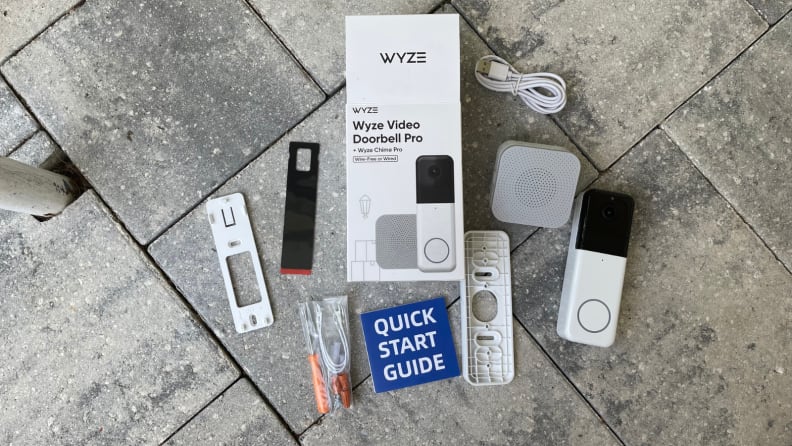
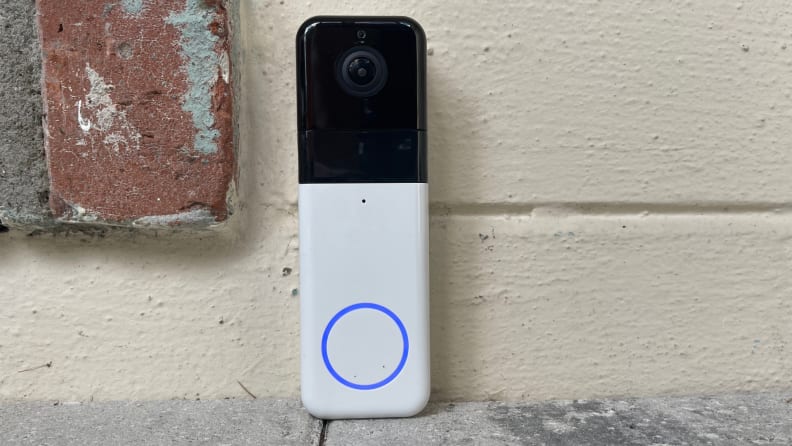
The Wyze Video Doorbell Pro comes with everything you need to install a smart doorbell at home.
Colors: White
Connectivity: 2.4GHz and 5GHz Wi-Fi
Smart assistants: Alexa, Google Assistant
Installation type: Hardwire 16V-24V AC, ≥10VA or rechargeable 6500 mAh lithium battery (included)
Operating temperature: 4°F to 122°F
Field of view: 150° horizontal, 150° vertical
Video Resolution: 1440p HD
Dimensions: 5.5-inch x 1.8-inch x 1.1-inch
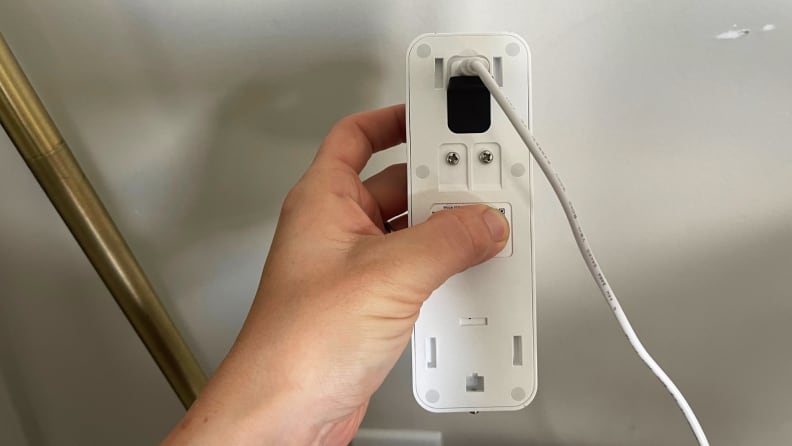
Setting up the Wyze Video Doorbell is a simple and quick process. Plan to spend more time if you go the hardwired route, as sometimes the install can take longer depending on the state of your electrical wires. The process is even simpler if you go the battery-powered route, as there won't be any wires to fiddle with. The doorbell comes with a slight charge right out of the box, but best to plug it in for a full battery before installing it on your home. To charge the doorbell, plug the included micro USB cable into the back of the doorbell.
Also included in the box are back plates, 3M tape, screwdriver, wire nuts, several bracket screws, and extension wires. The doorbell also comes with a plug-in chime.
What we like
Multiple installation options
Credit: Reviewed / Rachel Murphy
The Wyze Video Doorbell Pro comes with a built-in rechargeable battery, which can be charged via a micro USB cable. Or, you can hook it up it to your existing doorbell wiring via the two screws on the back.
Dual-install methods continue to be one of the most common threads among video doorbell releases in recent memory—including the Wyze Video Doorbell Pro. The device can be hooked up to your existing doorbell wiring or you can use the included rechargeable battery.
Given that the OG Wyze doorbell only supports hardwired installations, it’s nice to see that the Wyze Video Doorbell Pro can run on battery power, in addition to connecting with your existing wiring. When it comes to home security, flexibility is key, allowing you to put your devices where you need the most protection.
Renters, and anyone who doesn’t want to make any permanent holes on the front of their home, will appreciate the inclusion of 3M adhesive tape for an extra-sturdy stick.
A doorbell view that shows it all—day and night
Credit: Reviewed / Rachel Murphy
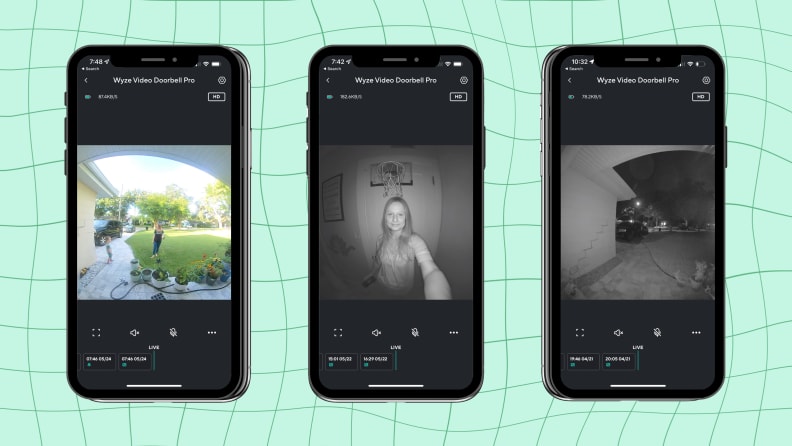
This is what the daytime and nighttime views looks like from the Wyze Video Doorbell Pro.
The Wyze Video Doorbell Pro records in 1440 HD video, a small but noticeable improvement from the 1080p HD view of the Wyze Video Doorbell + Chime. The view from the Pro is bright, clear, and easy to see during daylight, though it is occasionally hindered by minor artificating.
The digital zoom is 8X, allowing you to zoom in on faraway objects. This is the same you’ll find on Wyze’s basic video doorbell model, but better than the 6X digital zoom found on one of the best buzzers, Google’s Nest Doorbell (Battery).
At night, the doorbell uses six night vision LED lights to help you see what’s going on. In a dark room, the Wyze Video Doorbell Pro shows faces and features clearly up close.
The doorbell captures motion events like packages, people, and animals when enrolled in Wyze’s Cam Plus Plan starting at $1.25 per month. Without the paid plan, you’re limited to only general motion alerts and there's a five-minute cooldown period between each one.
The doorbell’s motion sensitivity settings can be adjusted between low and high in the Wyze app. This is also where you can define a detection zone to block certain areas from the camera's view, like your front yard flag blowing in the wind, to prevent false notifications.
Pretty good smart home support
Credit: Reviewed / Rachel Murphy
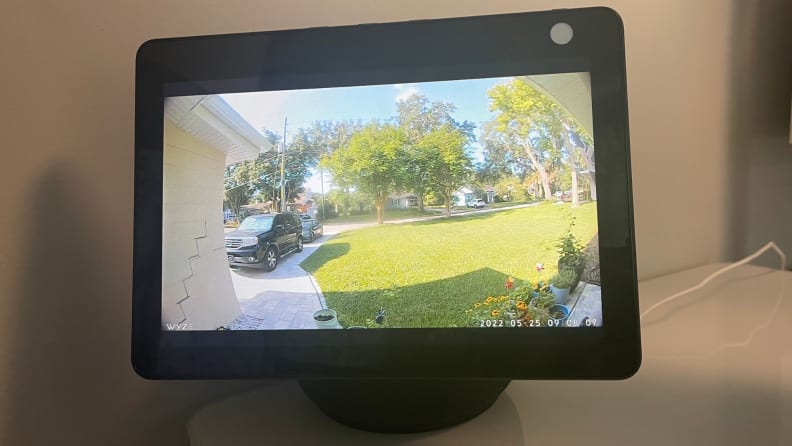
You can view the doorbell's live stream on a smart display like the Amazon Echo Show 10 (pictured) or Google's Nest Hub Max.
The Wyze Video Doorbell Pro works with Alexa and Google Assistant and can be added to the Amazon Echo and Google Home ecosystems. You can’t see the camera’s live view from these apps respectively, but you can pull up the live view on compatible smart displays like the Amazon Echo Show 10 and second-gen Google Nest Hub. I had trouble getting this feature to work properly when I tested the Wyze Doorbell + Chime, but had no issues this time around with the Pro version. The live view for Wyze doorbell does not automatically appear onscreen for either ecosystem's displays (as it does with Ring and Nest doorbells), so you'll need to call up the view yourself.
I wasn't able to get any of my Google Nest speakers or displays to do this, but Amazon Echo smart speakers and smart displays double as chimes, extending the reach of your current buzzer sound. This is especially helpful if you live in a large or two-story home where the sound of your doorbell doesn't carry to every room. It can also be helpful to those who are hard of hearing and need additional chimes placed throughout. (And don’t forget a plug-in chime comes with the Wyze Video Doorbell Pro.)
The doorbell also works with Alexa Routines, a handy, home automation feature, but you’ll need to pay for Wyze’s Cam Plus plan in order to use it. An example routine might trigger on your outdoor smart lights and bolt the front door smart lock when the doorbell detects motion at night.
At the time of publication, the doorbell does not work with Apple HomeKit. This is the case for most Wyze smart home devices, but the company is pledging support for Matter, a smart home protocol aimed at unifying ecosystems and devices. Perhaps we could see Siri support for Wyze devices in the future as a result.
What we don’t like
The design is boring and plain
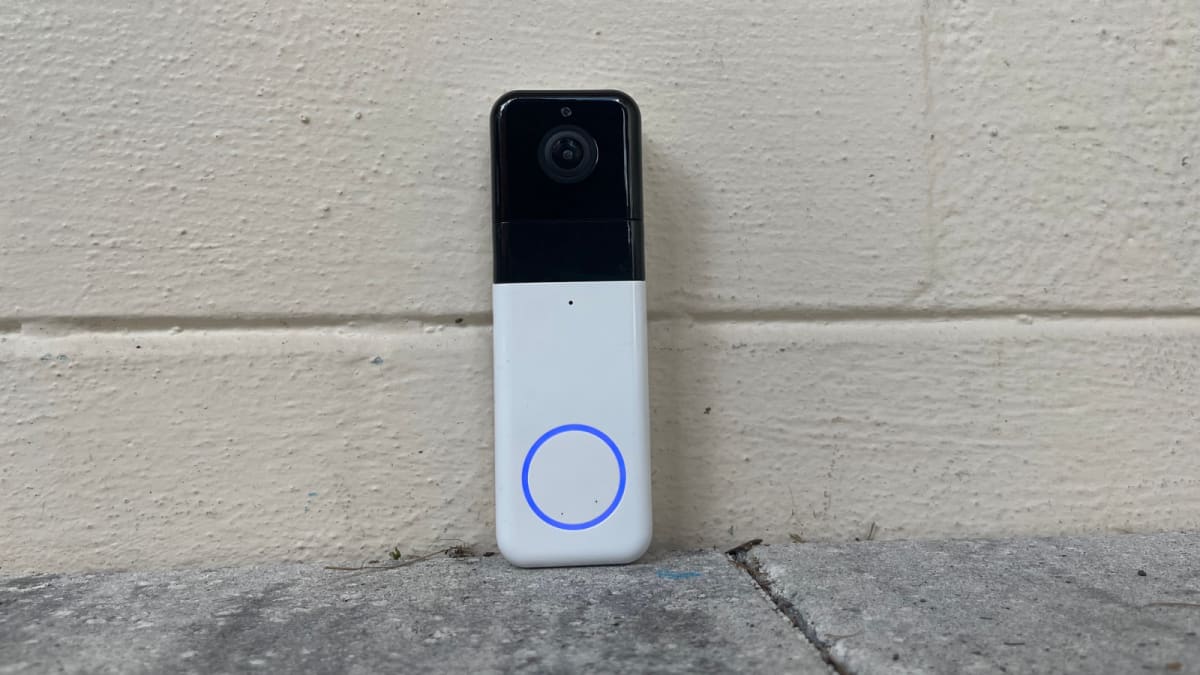
Looks are everything when it comes to a video doorbell—both on the inside and outside. While the view from the camera looks good, the doorbell itself does not. The design is chunky, plain, and uninspiring. The doorbell is only available in one color and does not come with interchangeable faceplates.
For comparison’s sake, the Nest Doorbell (battery) comes in several shades and has a modern-look to it, and most of Ring’s video doorbells, like the Ring 4, are compatible with Ring’s faceplates, offered in a variety of colors. Your outdoor security devices should (ideally) complement the rest of your home—not cheapen the look of it.
One gripe I took with the Wyze Doorbell + Chime is the so-so build quality. If there’s an upside to the Wyze Doorbell Pro’s hefty design, it’s that it feels sturdier and more durable than the previous model did.
To recharge the battery, the whole device must come down
The doorbell’s battery is built into the device itself, which means you need to take it down and bring it inside to charge for a full charge. While this may not seem like a huge deal, I prefer a video doorbell, like the Ring Video Doorbell 4, which has a removable rechargeable battery.
Oftentimes the appearance of a home security device like a video doorbell may be enough to scare off porch pirates—even if it’s not actually recording. When the doorbell isn’t there for extended periods of time, it can leave your home more vulnerable than it was before. The front of your home looks a bit bare without your favorite camera buzzer in place. Not to mention, you’ll have to install it again after it’s done charging, as opposed to simply popping the battery back into the compartment.
A removable battery also gives you the option to have a back-up at the ready your current one zonks out.
The battery life's longevity is questionable
The doorbell lasted about two weeks for me under normal settings. This is quicker than most other video doorbells I’ve tested, but I also live on a busy street. Some Wyze Video Doorbell Pro owners on Reddit note that the battery life does not last anywhere near Wyze’s 180-day estimate. Similar complaints appear on Amazon and Wyze’s website.
Your mileage will vary based on the number of events the doorbell detects—the more events, the quicker the battery will drain. However, the battery should last longer than a week or two. If you’re having trouble, reach out to Wyze about a replacement.
The chime needs to stay plugged in at all times
Credit: Reviewed / Rachel Murphy
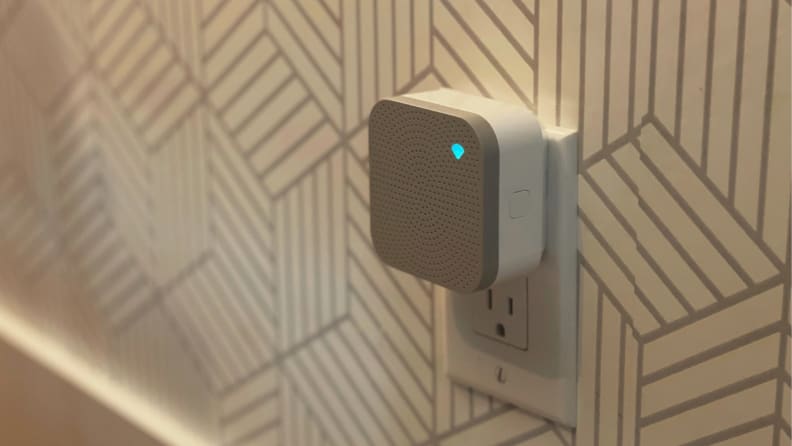
You can control the volume and tone settings for the Wyze Chime (pictured) in the Wyze app for iOS and Android.
One thing I quickly discovered is that the included chime is an integral part of the doorbell’s functionality. In fact, if the chime gets unplugged, you won’t be able to access the livestream of your doorbell at all. The chime helps extend the range of your wireless network to the doorbell. Considering that the Wyze Video Doorbell Pro doesn’t work with mechanical chimes, you may add a few smart speakers or additional Wyze Chimes around your house. There are 20 chime tones to select from (including a dog barking) and eight sound levels to help you hear across the house.
Privacy
Wyze claims to use symmetric and asymmetric encryption to protect user information. The Wyze app also offers two-factor authentication through either text message or the authenticator app to help keep your smart home safe and secure. In the Wyze app, you can also turn off audio and video recording for the doorbell. When motion is detected, a blue ring lights up around the doorbell press button. The light will continue to glow blue, letting someone know they are being recorded.
Should you buy the Wyze Video Doorbell Pro?
Yes, it offers good features and value.
Credit: Reviewed / Rachel Murphy
The Wyze Video Doorbell Pro is one of the best smart doorbells you can buy right now.
The Wyze Video Doorbell Pro has a wide view that shows faces clearly at day and night, it works with Alexa and Google Assistant, and it offers multiple installation options, making it an ideal fit for any front door. The drill-free installation is enticing to renters who don’t want to create holes in their apartments, as well as homeowners who want to place the doorbell in a non-traditional spot, such as a second entrance, like a side door.
There are a few quirks to keep in mind, like the varying battery life and the fact that you have to take the whole doorbell down to recharge it. For comparison’s sake, the more expensive Ring 4 Video Doorbell has a removable rechargeable battery, giving the appearance that your camera is on the lookout even when it’s not actually on. The Wyze Video Doorbell Pro isn’t the most attractive doorbell either and is limited to a single color and design. For something more stylish, we like the modern look and color options offered on the more expensive Nest Doorbell (battery).
But for a smart video doorbell under $100 that delivers package, people, and pet alerts without skimping on a detailed view, the Wyze Video Doorbell Pro is a value-packed choice.
The product experts at Reviewed have all your shopping needs covered. Follow Reviewed on Facebook, Twitter, Instagram, TikTok, or Flipboard for the latest deals, product reviews, and more.
Prices were accurate at the time this article was published but may change over time.
Meet the tester
Rachel Murphy
Editor, Home
@rachel_murphy
Rachel Murphy is Reviewed's home editor. She holds a journalism degree from the University of Central Florida. Prior to joining the team, she worked as a freelance writer for publications like Insider and Mashable, and as an associate editorial producer for Good Morning America. Aside from smart home tech, her interests include food, travel, parenting, and home renovation. You can usually find her sipping on coffee at any time of the day.
Checking our work.
Our team is here for one purpose: to help you buy the best stuff and love what you own. Our writers, editors, and lab technicians obsess over the products we cover to make sure you're confident and satisfied. Have a different opinion about something we recommend? Email us and we'll compare notes.
Installing a home security camera used to require setting up a big, expensive surveillance system, but that's no longer the case. Today, there are affordable options available for both houses and apartments. Modern home security cameras can be wired or wireless, and positioned either inside or outside your home.
The function of a home security camera is threefold: to surveil your property, monitor pets and children, and retain footage if a break-in or vandalism occurs. In most cases, you'll be able to set up a home security camera yourself in under an hour — especially if you're installing it indoors.
The home security cameras we're recommending can connect directly to a home Wi-Fi network, which will allow you to access live and recorded video on your smartphone. Some security cameras can discern the difference between animals, people, and vehicles, so you're only notified when it senses something is out of place. Higher-end home security cameras even have a built-in alarm to scare unwanted guests.
There's a lot to think about when getting a home security camera, especially if it's the first piece of equipment you're bringing into your home. Our guide will explain what to look for in order to determine the best home security camera for you, in addition to giving you our recommendations.
— Best Overall: Arlo Pro 4 — Best Budget: Wyze Cam — Best Doorbell Camera: Arlo Video Doorbell — Best for Indoors: Eufy Solo IndoorCam — Best Night Vision: Ring Floodlight Cam Wired Plus — Best Battery-Powered:
Blink Outdoor Security Camera
How We Picked the Best Home Security Cameras
I used a broad range of criteria in reviewing dozens of cameras to make my picks for best home security cameras. I reviewed multiple models from numerous industry leading brands, looking for the top features and most consistent quality. I gave special credence to brands that did certain features well:
Image Quality: While today’s security cameras offer a variety of great additional features, first and foremost they need to be able to capture clear images and cover the area that they’re intended to monitor. With that in mind, I stuck with cameras with an adequate field of vision that produced high-definition pictures that would allow the user to recognize faces easily. That said, there can be risks to owning a home security camera,
Connectivity: Connectivity is also key. A security camera shouldn’t require the user to purchase an expensive hub, so I stuck with security cameras with integrated Wi-Fi that allowed the user to access live and recorded footage with a compatible app from a smart device.
Smart Features: When possible, I also chose cameras that are on the cutting edge of home surveillance technology with smart features that allow them to discern between animals, vehicles, packages, and people and send the user alerts accordingly.
Best Home Security Cameras: Reviews and Recommendations
Intruder Safe Quality. Arlo
Why It Made The Cut: The Arlo 4 offers exceptional resolution, loads of useful additional features, and connectivity that doesn’t require an expensive hub.
Specs: — Connectivity: Wi-Fi — Resolution: 2K — Field of View: 160 degrees
Pros: — Built-in Wi-Fi capability means there is no hub required for this camera — Excellent 2K resolution makes recognizing faces easy — Night vision — Spotlight and 80-decibel siren scare away unwanted visitors — More affordable than the Arlo 3
Cons: — Must subscribe to Arlo Smart Plan to access video and some features
Excellent picture quality, long battery life, and easy installation make the Arlo Pro 4 the best home security camera overall that you can mount to your home. The Arlo Pro 4 is the latest incarnation of Arlo’s Pro line of cameras. While it looks very similar to the Pro 3, it differs in price and connectivity The Pro 4, unlike the Pro 3, has built-in Wi-Fi, so it doesn’t require a hub (although you can connect it to the Arlo Smart Hub if you happen to have one).
Being able to see who’s wandering onto your property, be it friend or foe, is critical for any surveillance camera. With its 4-megapixel sensor and HDR technology, the Arlo Pro 4 produces 2K resolution video with a broad 160-degree field of vision and 12x digital zoom, giving it an exceptionally powerful capacity to pick out facial features. Since most nefarious activities happen at night, the Arlo Pro is equipped with two infrared LEDs that produce high-resolution black and white video in the dark.
The Arlo also comes with features that will help ward off unwanted visitors, including a motion-activated spotlight, a microphone, a loudspeaker for interacting with visitors, and an 80-decibel siren for scaring trespassers away.
Similar to other home security cameras, Arlo makes its recorded video available via a paid subscription plan. The company charges $2.99 a month for 30 days of video along with advanced features, such as package and object detection and smart alerts. You can expand that subscription to cover up to five cameras for $9.99 per month. All video footage is accessible via the Arlo app, which displays live and recorded video footage, allowing you to interact with visitors via the microphone and speaker, and activate the built-in siren.
Affordable Bells and Whistles. WYZE
Why It Made The Cut: We couldn’t find a similarly outfitted security camera that could even approach the low price of the Wyze Cam, which is why this product is our pick for the best cheap security camera.
Specs: — Connectivity: Wi-Fi — Resolution: 1080p — Field of View: 130 degrees
Pros: — One of the most affordably priced cameras on the market — Integrated Wi-Fi means no hub is required to access video — Full-color night vision — Rolling 14 days of free cloud storage for recorded video
Cons: — Lower resolution than other cameras offer — Narrower 130-degree field of vision
Though Wyze may have increased the price of its security camera with its newest version of the Wyze Cam, it’s actually a better deal. That’s because version 3 of the Wyze security camera includes integrated Wi-Fi, so it no longer requires a hub to view video. Simply download the Wyze app and view live or recorded video via a smartphone. Wyze also works with voice commands via Amazon Alexa or Google Assistant.
Unlike most security cameras that require you to pay a monthly subscription to access recorded video, the Wyze camera gives you 14 days of free recorded video footage from its motion-activated sensor. It also includes a backup microSD card slot in case you don’t want to use cloud storage.
With a 1080p resolution and 130-degree field of vision, Wyze’s video may not quite match some of the higher-priced cameras on the market, but it does come with many of the same bells and whistles, including motion detection and a one-way talk feature. The camera will also alert you if it happens to pick up loud noises, such as a smoke alarm going off. If that isn’t enough, you can add more features, such as a spotlight, at a small additional cost. Also new to this latest version of the Wyze camera is a Starlight Sensor that records nighttime video in full color.
There are limits to Wyze’s free monitoring services, but you can upgrade to its $1.99 per month subscription service ($1.25 when billed annually) per camera. You’ll get an even more robust monitoring service that includes unlimited video length, smart detection for persons, pets, and package deliveries, and facial recognition.
Doorbell With Eyes. Arlo
Why It Made The Cut: The Arlo doorbell camera is the best doorbell camera and one of the most affordable models we found that offers a 180-degree field of vision for package detection.
Specs: — Connectivity: Wi-Fi — Resolution: 2K or 4K — Field of View: 180 degrees
Pros: — Wide field of view allows you to monitor packages sitting on the doorstep — Advanced motion detection with subscription — Cloud storage is affordably priced at $3 a month — Programmable motion detection
Cons: — Larger profile than other doorbell cameras
Arlo makes some of the best security cameras on the market, and this doorbell camera easily lives up to the brand's reputation. In addition to delivering high-resolution video footage of the area around your front door, the Arlo Video Doorbell features adjustable motion detection zones, two-way audio, and even an integrated siren that you can activate from your phone. Subscribe to Arlo’s $3 per month video cloud storage subscription service, and you also get cool features like animal, package, and vehicle smart detection.
While these features are solid, one of the coolest things about this camera is its square-aspect ratio, which gives you a full view of the doorstep, making it ideal for monitoring package deliveries while also getting a head-to-toe view of visitors.
Like other Arlo security cameras, its doorbell camera connects to Wi-Fi, allowing the user to access the doorbell’s live and recorded video footage as well as its features via an app, without the need for an additional purchase of a hub. The app also walks you through installation and configuration with step-by-step instructions and pictures, which makes setting up this doorbell camera very easy. Other useful features include a motion-activation function, and Arlo Foresight, which records video just before someone rings the doorbell, giving you a more complete picture of what’s going on outside your door.
With a solid set of useful features, programmable motion detection, and a wide field of vision, the Arlo is a great doorbell camera option at a very reasonable price.
Home Watcher. Eufy.
Why It Made The Cut: This indoor camera has a high resolution sensor, and can follow a subject around.
Specs: — Connectivity: Wi-Fi — Resolution: 2K — Field of View: 125 degrees
Pros: — AI can detect different sounds — Full 360-degree panning — Compatible with Apple's HomeKit
Cons: — No built-in local storage
Eufy's Solo IndoorCam is one of the best pieces of home security equipment we've ever tested, producing consistency clear clips, and maintaining a strong connection to the internet.
On paper, the Solo IndoorCam offers a premium set of features for its price. It can record better-than-HD video, supports both cloud and local storage, works with Apple's HomeKit standard, and has an excellent night mode. In our tests, it surpassed our expectations. We viewed video taken during daylight hours and at night, and always ended up with a clean recording. We set the IndoorCam up using Eufy's app and HomeKit (Apple's built-in smart-home accessory app), and were up and running within a few minutes either way. The setup process is intuitive enough that we can confidently recommend this security camera even if you're not very tech savvy.
The biggest reason to get Eufy's IndoorCam over similar models is its ability to follow a subject around. The camera sits upon a rotating base, which turns once the camera begins detecting motion. This means a potential thief will always remain in frame when the IndoorCam is recording them. This makes the camera's field of view somewhat less important, though Eufy didn't skimp in that regard. If you feel uncomfortable storing your home security camera's footage in the cloud (or paying a monthly fee for the privilege), Eufy allows you to save your recordings to a MicroSD Card. It doesn't include a memory card, though, so you'll have to pick it up separately.
If you've found the idea of setting up a home security camera daunting, or have been concerned about where to place it to ensure it'll keep a close watch on a big area, Eufy's IndoorCam solves both problems. It's also part of a larger family of home security gadgets, so you can built up a whole-home security system over time.
Security Night Light. Ring
Why It Made The Cut: With excellent night vision and powerful built-in flood lights, the Ring Floodlight Cam is a home security watchdog.
Specs: — Connectivity: Wi-Fi — Resolution: 1080p HD — Field of View: 140 degrees
Pros: — Full-color night vision even in low light conditions — Large 2000-lumen flood lights that work with a motion detector — Programmable motion detector zones
Cons: — Must be hard wired to a lightbox
With its high-definition color night vision, this best night vision security camera from Ring is well suited for nighttime security. It features a 140-degree field of vision that can cover a yard or driveway along with two large 2,000-lumen flood lights that activate with a motion detector (the app conveniently allows you to set specific motion detection zones). If the powerful floodlight isn’t enough to scare off intruders, you can blast them with the camera’s built-in 105-decibel security siren.
While the flood lights add an important extra layer of security to this camera, they do mean that you’ll have to attach it to a lightbox hook-up on the exterior of your home. This requirement limits the camera’s placement, unless you’re a savvy installer, or you hire an electrician for a custom installation.
Similar to other outdoor security cameras, the Ring Floodlight Cam includes integrated Wi-Fi, allowing you to view footage via the Ring app. With a subscription to the Ring Protect Plan, you can view up to 60 days of recorded video footage.
Ultra Portable. Blink.
Why It Made The Cut: This home security camera can be used indoors or outdoors, and runs on a set of batteries that can last years.
Specs: — Connectivity: Wi-Fi — Resolution: 1080p — Field of View: 110 degrees
Pros: — Runs on battery power — Weather Resistant — Works with Amazon's Alexa
Cons: — Slim field of view
We've always been happy with our experiences using Blink's Outdoor Security Camera, and its small, battery-powered design allows you to install it in very tight spaces. The camera is basically a 2.8-inch square, with flat edges that allow it to stand upright without a stand. It runs on a pair of AA batteries (included), which Blink says can power the camera for up to two years.
Some companies make compromises in order to ensure their tech runs well on battery power, but that's not the case with Blink's Outdoor Security Camera. It can record full-HD footage, has an infrared Night Vision mode, and includes a two-way speaker system to communicate with people you see on camera. Video can be stored on the cloud, or locally if you get Blink's Sync Module 2 (not included). The only technical fault we found with Blink's Outdoor Security Camera was its 110-degree field of view, which is a little skimpier than other home security cameras.
That's less of an issue with Blink's camera because of its small size, which allows you to mount it into a corner of your room (or the outside of your house), where larger cameras wouldn't fit. Once it was installed, we had no problem setting up the camera using Blink's app, which made it simple to view and delete video clips. One of this camera's standout features is the option to set up motion detection zones, so you don't get a notification every time somebody drives by your house.
If you want a compact, premium home security camera that will keep your home safer even when the power goes out, Blink's Outdoor Camera is your best option.
Things to Consider Before Buying a Security Camera
Field of View
A camera’s field of vision is typically measured in degrees. While you may be tempted to go with a camera that offers the broadest field of vision, not every setting needs an extra-wide field of vision, and you may end up including areas you don’t need to monitor. For broad areas, such as a front or back yard, look for a security camera with at least a 140-degree field of view. For smaller areas, like a room or smaller enclosed outdoor areas, 115 degrees is often adequate.
While we typically value a field of view designed for a horizontal perspective, in certain situations a vertical view may also be useful. For a doorbell camera, for example, a camera with a broad vertical field of vision allows you to see visitors from head to toe and monitor packages sitting on your doorstep.
Camera Location
Where you plan to place the camera has a lot to do with the type of camera you need. Outdoor cameras are ideal for monitoring your property to deter potential burglars or trespassers, while also protecting your car and outdoor property. Indoor cameras allow you to check up on the kids while you’re out running errands, or monitor a pet remotely. Doorbell cameras act as doormen, letting you know who is at the door without having to open it, while also allowing you to check on deliveries while you’re away from home.
Additional Features
Most modern security cameras do more than simply record video. Other features include two-way microphones that allow you to communicate through the camera, as well as sirens and floodlights designed to scare off intruders. Cameras with smart technology can detect movement, determine if the source of a disturbance is a person, animal, or vehicle, and determine whether to alert you or not. These useful features impact the price of a camera, so it’s important to decide what features you’re willing to pay for, and which ones you don’t need, before you go shopping for a security camera. You can also increase the safety of your home with home security that goes beyond the camera.
FAQs
Q: Do home security cameras need to be plugged in?
That depends on the security camera. Some require a constant power source and therefore either need to be plugged into an outlet or hardwired to an electrical box. Many security cameras operate off of a lithium-ion battery, which will power the camera for months before requiring a recharge.
Q: Are security cameras worth it?
A security camera’s ability to deter burglars makes it worth the cost. According to a study conducted by the University of North Carolina, 60 percent of burglars will opt for another home if they see security cameras or an alarm. Security cameras used to be expensive, requiring hardwiring to a monitoring system or a hub to connect it to the Web. Today’s cameras are affordable and can connect to a home’s Wi-Fi, making live and recorded video easily accessible via a smartphone. Since most cameras charge low cloud storage subscription fees, it’s hard to argue against buying a security camera.
Q: How much does a home security camera cost?
Security cameras range in price from as little as $35 to $300 or more. The price typically depends on the camera's resolution and the features that it offers. Cameras with 2K resolution, night vision, smart recognition technology, and other features cost more than more basic models.
Q: Where is the best place to mount a home security camera?
The best place to mount a home security camera indoors is in the corner of a room opposite the entry point if you’re using it for security. If you’re using it to monitor pets or children, position it to view places animals and people typically gather, such as a table or sofa. Outdoors, position the camera on a corner of the house to view a broad area, making sure to include the home’s entryway as well as any cars that could be the subject of a break-in.
Q: What are the best outdoor security cameras?
The best outdoor security cameras have a broad field of vision, high resolution, and are durably built to endure the elements. The Arlo Pro 4, with its 180-degree field of vision, 2K resolution, and weather-proof construction is one of the best outdoor cameras on the market.
Final Thoughts
The Arlo Pro 4’s excellent video quality coupled with a broad 180-degree field of vision and extra features that include an 80-decibel siren, 12x zoom, and object detection make it one of the best security cameras on the market. Those looking for a more affordable option should consider the Wyze Cam, which costs a fraction of the price of other security cameras and offers 14 days of free cloud storage.
This post was created by a non-news editorial team at Recurrent Media, Futurism’s owner. Futurism may receive a portion of sales on products linked within this post.
:quality(70)/cloudfront-us-east-1.images.arcpublishing.com/tronc/K5NOAPOGBNEPJADEDZLJ6PPMWI.JPG)
:quality(70)/cloudfront-us-east-1.images.arcpublishing.com/tronc/K5NOAPOGBNEPJADEDZLJ6PPMWI.JPG)